Published on: June 3, 2026
When to Use IT Staff Augmentation vs. Managed Services
Home » Blogs » IT-Services »
[7 mins read]

Scaling IT capabilities is rarely about just hiring more hands. It’s about delivering outcomes efficiently without stretching your internal team too thin. Whether you’re launching a new platform, upgrading systems, or migrating to the cloud, you’ll likely hit the same question:
Should we augment our team — or outsource the entire initiative?
Two popular models — IT staff augmentation and Managed services — offer different paths to scale. But they’re not interchangeable. Choosing the right one at the wrong time can waste budget, delay timelines, or increase risk.
This post breaks down both models in detail — what they are, where each excels, when to combine them, and how to avoid the mistakes that trip up even experienced IT leaders.
🧩 What is IT staff augmentation?
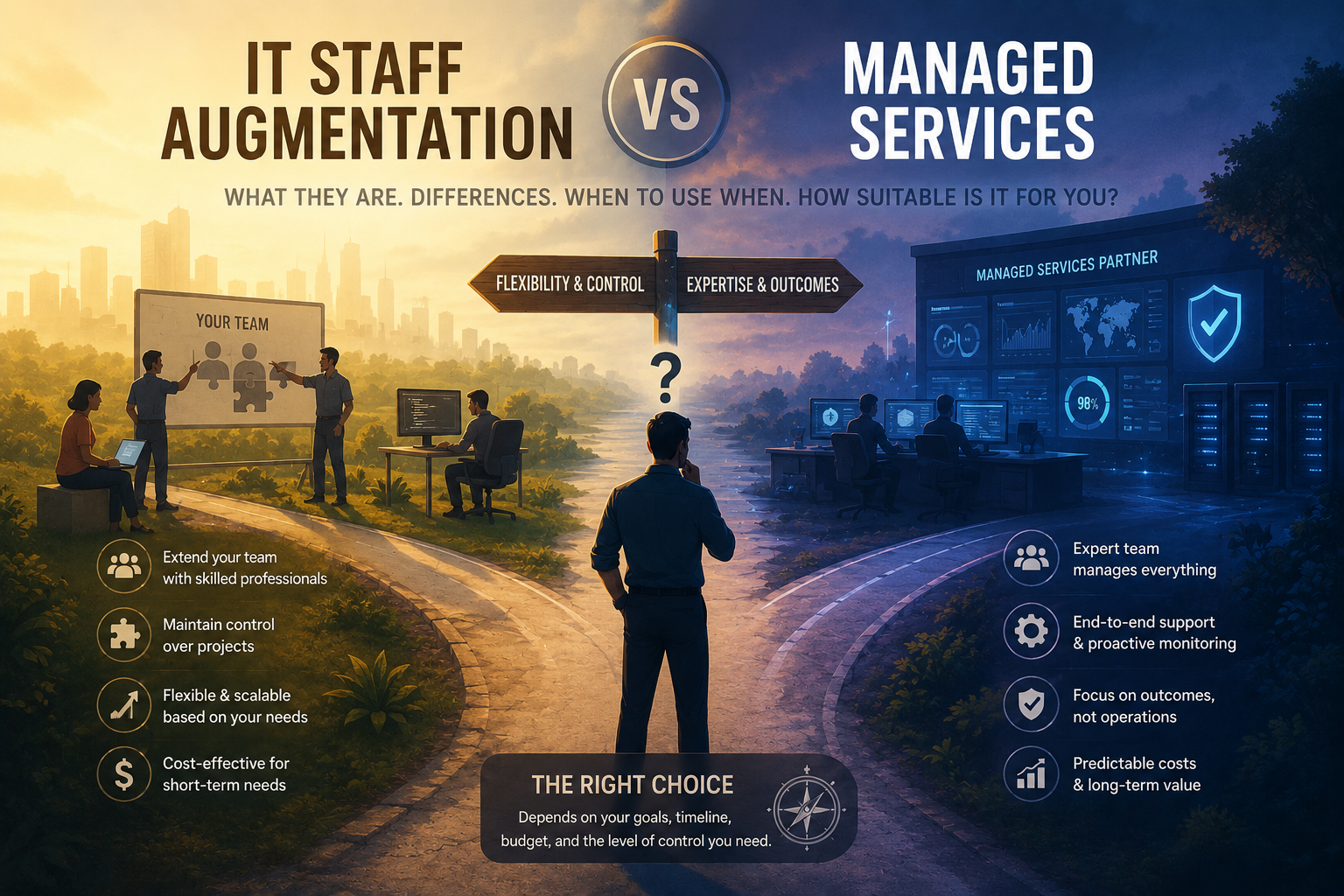
Staff augmentation is a delivery model where you bring in external technical resources to work under your direction. They join your team, follow your processes, and report to your managers — but are not full-time employees.
Think of it as renting capability without hiring headcount.
✅ When to use staff augmentation
➡️ You need more hands on deck during a busy product cycle
➡️ Your project is already defined and you need to execute
➡️ Your team wants full control over how work gets done
➡️ You’re missing specific skills — DevOps, QA, frontend engineering
| 🔧 Key benefits | ⚠️ Limitations |
|---|---|
| Speed to scale — ramp up talent in days or weeks | Your managers must still oversee the work |
| Flexibility — add or remove resources as scope changes | Onboarding and knowledge transfer still takes effort |
| Control — you set priorities, manage timelines, own results | Best suited for capacity gaps — not full project accountability |
| No long-term commitment — no need to expand your FTE base |
🏢 What is a managed services model?
Managed services shift the ownership of outcomes to a third-party provider. You define the goal or result — they deliver it. This could include everything from infrastructure management to testing to full application development.
Unlike staff augmentation, you don’t manage individuals — you manage the scope, deliverables, and KPIs.
✅ When to use managed services
➡️ You’re short on internal capacity or expertise
➡️ The project has clearly defined milestones or deliverables
➡️ You want accountability for results, not just hours
➡️ You’re managing ongoing IT operations — cloud, security, monitoring
| 🔧 Key benefits | ⚠️ Limitations |
|---|---|
| Clear accountability — provider owns delivery, timelines, and performance | Less flexible once the scope is locked |
| Less day-to-day oversight — your team sets goals, not tasks | Can be harder to course-correct midstream |
| Process maturity — providers bring tools, playbooks, and governance | Requires detailed contracts and SLA governance to work effectively |
| Service continuity — ideal for 24/7, high-availability needs |
📊 Key differences at a glance
| Aspect | Staff Augmentation | Managed Services |
|---|---|---|
| Ownership | You manage the people and tasks | Partner owns the outcome and delivery |
| Integration | Embedded in your team | Operates as an external unit |
| Use case | Fill talent or skill gaps | Deliver a defined project or run an ongoing service |
| Oversight needed | High — your managers lead execution | Medium — partner executes against defined SLAs |
| Cost structure | Per-resource, per-hour or month | Fixed or milestone-based fees |
| Scalability | Easy to scale short-term needs | Easy to scale delivery at a function or service level |
🎯 How to choose the right model
There’s no universal best option. The right choice depends on three factors.
1. Type of work
Need to extend a sprint team or onboard niche skills? → Staff augmentation
Delivering a cloud migration, security audit, or test automation rollout? → Managed services
2. Internal capacity
You have strong project managers and tech leads? → You can manage augmented staff
Your team is fully loaded or lacks specific knowledge? → Let a partner take full ownership
3. Risk profile
Building customer-facing features and want full creative control? → Staff augmentation
Handling compliance-heavy or SLA-bound systems? → Managed services reduce exposure
🔀 When to combine both models
Many IT leaders now choose hybrid delivery models that mix augmentation and managed services — and for good reason. The combination gives you tactical flexibility and strategic coverage without sacrificing cost visibility.
Here are three common hybrid combinations that work well in practice:
➡️ Augment your dev team for a product release while outsourcing the testing function
➡️ Use managed services to run 24/7 cloud infrastructure while augmenting for DevOps velocity
➡️ Outsource the build phase of an application, then bring in augmented staff for ongoing enhancements
💡 What the hybrid model gives you
✅ Tactical flexibility — scale resources up or down as scope shifts
✅ Strategic coverage — a partner owns the outcomes that matter most
✅ Cost control with visibility — you pay for execution, not uncertainty
🚨 Common pitfalls when choosing the wrong model
Even experienced IT leaders can misstep when selecting between staff augmentation and managed services. Here are the three mistakes that come up most often — and how to avoid them.
Mistake 1: Overloading internal teams
Adding augmented staff doesn’t reduce internal workload — it increases coordination needs. If your project leads don’t have the capacity to manage external contributors, you’ve added people without adding velocity. If internal bandwidth is the constraint, managed services may be more efficient than augmentation.
Mistake 2: Outsourcing without clear scope
Vague objectives in a managed services engagement lead directly to scope creep and delivery issues. Before kickoff, define KPIs, deadlines, documentation standards, and escalation paths in writing. What isn’t defined gets interpreted — usually in ways that don’t serve you.
Mistake 3: Using one model for everything
Neither model fits all scenarios or all phases of a project. Evaluate the delivery model per function and per project phase. Start outsourced, then transition in-house — or the reverse — as needs evolve. Locking into a single model for an entire initiative is how projects go sideways midstream.
🔄 When to transition from one model to the other
Your needs will evolve over time. Here is how to recognize when a transition makes sense:
| Shift from Staff Augmentation → Managed Services when… | Shift from Managed Services → Staff Augmentation when… |
|---|---|
| You need outcome ownership, not just extra hands | You want tighter integration with product teams |
| Internal teams are stretched thin | You’re building long-term internal capability |
| The initiative is operational, not strategic | Scope is fluid and needs agility |
📊 Real-world scenario: a 3-phase transition strategy
Client: Mid-market SaaS platform in logistics
Challenge: Needed to modernize infrastructure, build new apps, and scale globally in 12 months
| Phase | Model used | What was delivered |
|---|---|---|
| Phase 1 | Managed Services | Cloud migration, Kubernetes setup, and observability delivered with SLAs in 10 weeks |
| Phase 2 | Staff Augmentation | iFlow onboarded full-stack engineers into product squads in under 2 weeks for feature velocity |
| Phase 3 | Hybrid | iFlow maintained infrastructure and test automation as a managed service while the client scaled product delivery with full visibility |
Outcome: On-time product launch, 85% reduction in downtime, zero internal hiring required during execution.
How iFlow helps you choose and deliver the right model
At iFlow, we understand that delivery success depends on choosing the right engagement model — not just filling roles.
We work with startups, mid-market firms, and enterprise IT leaders to help them:
- Evaluate readiness for staff augmentation vs. managed services
- Structure hybrid delivery models for different functions
- Transition between models as internal capabilities evolve
- Avoid over-staffing or under-scoping, especially during major product or infrastructure changes
Our offerings include:
- Staff augmentation across critical IT functions: DevOps, QA, cloud engineering, frontend/backend development, Salesforce, data engineering, and more
- Managed services for cloud operations, application modernization, QA automation, 24/7 support, and infrastructure monitoring
- Hybrid co-managed teams, where you maintain strategic oversight and we provide delivery, talent, and continuity
Every engagement starts with a diagnostic to understand your current delivery capacity, tech stack needs, compliance requirements, and scaling goals. From there, we help you build a model that fits today — and adapts for tomorrow.
Whether you’re growing fast and need delivery velocity, or stabilizing and want to optimize long-term ownership, iFlow is built to meet you where you are — and take you where you need to go.
💡 Delivery model selection matrix
| Criteria | Choose Staff Augmentation if… | Choose Managed Services if… |
|---|---|---|
| Project scope | Evolving or flexible, with sprint-by-sprint goals | Fixed scope with clear milestones and timelines |
| Internal oversight | You have team leads to manage day-to-day work | You lack bandwidth and need a partner to own outcomes |
| Speed to execution | You need extra resources fast, with minimal ramp-up | You need complete delivery within a fixed SLA |
| Strategic fit | You’re building long-term capabilities in-house | You need delivery now but may transition ownership later |
| Risk tolerance | You’re okay owning delivery risks internally | You need shared or fully external accountability |
Contact iFlow to discuss which delivery model fits your next initiative.
Frequently Asked Questions
Ans: Yes — and many do. For example, you might outsource QA while using augmented engineers for frontend development.
Ans: Treating it like a staffing decision instead of a delivery strategy. Always ask: “Who should own the outcome?”
Ans: Staff augmentation usually ramps in 1–2 weeks. Managed services take 2–4 weeks to scope, define, and launch properly.